Hash Table
A hash table, also known as a hash map, stores mappings from keys key to values value, enabling efficient lookups. Specifically, given a key key, we can retrieve the corresponding value value from a hash table in \(O(1)\) time.
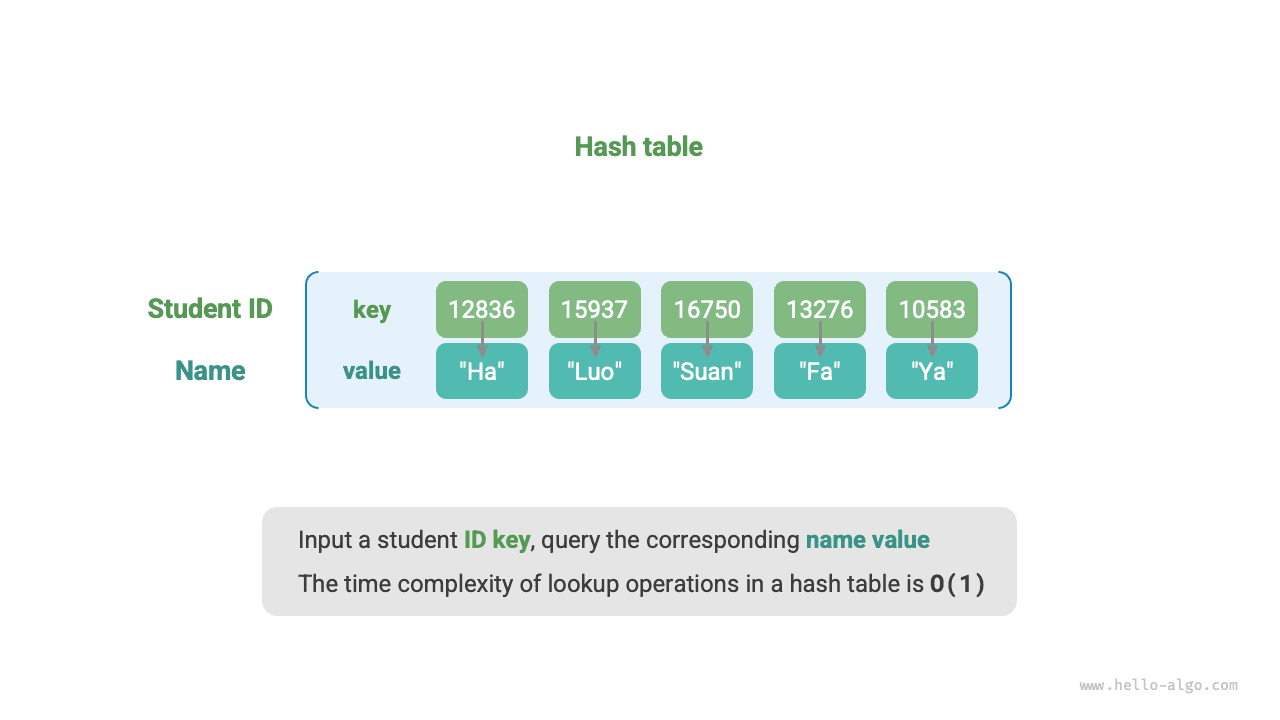
As shown below, suppose we have \(n\) students, each with two pieces of information: a name and a student ID. If we want to support the query "given a student ID, return the corresponding name," we can use the hash table shown below.
In addition to hash tables, arrays and linked lists can also implement query functionality. Their efficiency comparison is shown in the following table.
- Adding elements: Simply add elements to the end of the array (linked list), using \(O(1)\) time.
- Querying elements: Since the array (linked list) is unordered, all elements need to be traversed, using \(O(n)\) time.
- Deleting elements: The element must first be located, then deleted from the array (linked list), using \(O(n)\) time.
Table
| Array | Linked List | Hash Table | |
|---|---|---|---|
| Find element | \(O(n)\) | \(O(n)\) | \(O(1)\) |
| Add element | \(O(1)\) | \(O(1)\) | \(O(1)\) |
| Delete element | \(O(n)\) | \(O(n)\) | \(O(1)\) |
As we can see, insertion, deletion, lookup, and update operations in a hash table all have time complexity \(O(1)\), making hash tables highly efficient.
Common Hash Table Operations
Common operations on hash tables include: initialization, query operations, adding key-value pairs, and deleting key-value pairs. Example code is as follows:
# Initialize hash table
hmap: dict = {}

# Add operation
# Add key-value pair (key, value) to hash table
hmap[12836] = "XiaoHa"
hmap[15937] = "XiaoLuo"
hmap[16750] = "XiaoSuan"
hmap[13276] = "XiaoFa"
hmap[10583] = "XiaoYa"

# Query operation
# Input key into hash table to get value
name: str = hmap[15937]

# Delete operation
# Delete key-value pair (key, value) from hash table
hmap.pop(10583)
/* Initialize hash table */
unordered_map<int, string> map;

/* Add operation */
// Add key-value pair (key, value) to hash table
map[12836] = "XiaoHa";
map[15937] = "XiaoLuo";
map[16750] = "XiaoSuan";
map[13276] = "XiaoFa";
map[10583] = "XiaoYa";

/* Query operation */
// Input key into hash table to get value
string name = map[15937];

/* Delete operation */
// Delete key-value pair (key, value) from hash table
map.erase(10583);
/* Initialize hash table */
Map<Integer, String> map = new HashMap<>();

/* Add operation */
// Add key-value pair (key, value) to hash table
map.put(12836, "XiaoHa");
map.put(15937, "XiaoLuo");
map.put(16750, "XiaoSuan");
map.put(13276, "XiaoFa");
map.put(10583, "XiaoYa");

/* Query operation */
// Input key into hash table to get value
String name = map.get(15937);

/* Delete operation */
// Delete key-value pair (key, value) from hash table
map.remove(10583);
/* Initialize hash table */
Dictionary<int, string> map = new() {
    /* Add operation */
    // Add key-value pair (key, value) to hash table
    { 12836, "XiaoHa" },
    { 15937, "XiaoLuo" },
    { 16750, "XiaoSuan" },
    { 13276, "XiaoFa" },
    { 10583, "XiaoYa" }
};

/* Query operation */
// Input key into hash table to get value
string name = map[15937];

/* Delete operation */
// Delete key-value pair (key, value) from hash table
map.Remove(10583);
/* Initialize hash table */
hmap := make(map[int]string)

/* Add operation */
// Add key-value pair (key, value) to hash table
hmap[12836] = "XiaoHa"
hmap[15937] = "XiaoLuo"
hmap[16750] = "XiaoSuan"
hmap[13276] = "XiaoFa"
hmap[10583] = "XiaoYa"

/* Query operation */
// Input key into hash table to get value
name := hmap[15937]

/* Delete operation */
// Delete key-value pair (key, value) from hash table
delete(hmap, 10583)
/* Initialize hash table */
var map: [Int: String] = [:]

/* Add operation */
// Add key-value pair (key, value) to hash table
map[12836] = "XiaoHa"
map[15937] = "XiaoLuo"
map[16750] = "XiaoSuan"
map[13276] = "XiaoFa"
map[10583] = "XiaoYa"

/* Query operation */
// Input key into hash table to get value
let name = map[15937]!

/* Delete operation */
// Delete key-value pair (key, value) from hash table
map.removeValue(forKey: 10583)
/* Initialize hash table */
const map = new Map();
/* Add operation */
// Add key-value pair (key, value) to hash table
map.set(12836, 'XiaoHa');
map.set(15937, 'XiaoLuo');
map.set(16750, 'XiaoSuan');
map.set(13276, 'XiaoFa');
map.set(10583, 'XiaoYa');

/* Query operation */
// Input key into hash table to get value
let name = map.get(15937);

/* Delete operation */
// Delete key-value pair (key, value) from hash table
map.delete(10583);
/* Initialize hash table */
const map = new Map<number, string>();
/* Add operation */
// Add key-value pair (key, value) to hash table
map.set(12836, 'XiaoHa');
map.set(15937, 'XiaoLuo');
map.set(16750, 'XiaoSuan');
map.set(13276, 'XiaoFa');
map.set(10583, 'XiaoYa');
console.info('\nAfter adding, hash table is\nKey -> Value');
console.info(map);

/* Query operation */
// Input key into hash table to get value
let name = map.get(15937);
console.info('\nInput student ID 15937, queried name ' + name);

/* Delete operation */
// Delete key-value pair (key, value) from hash table
map.delete(10583);
console.info('\nAfter deleting 10583, hash table is\nKey -> Value');
console.info(map);
/* Initialize hash table */
Map<int, String> map = {};

/* Add operation */
// Add key-value pair (key, value) to hash table
map[12836] = "XiaoHa";
map[15937] = "XiaoLuo";
map[16750] = "XiaoSuan";
map[13276] = "XiaoFa";
map[10583] = "XiaoYa";

/* Query operation */
// Input key into hash table to get value
String name = map[15937];

/* Delete operation */
// Delete key-value pair (key, value) from hash table
map.remove(10583);
use std::collections::HashMap;

/* Initialize hash table */
let mut map: HashMap<i32, String> = HashMap::new();

/* Add operation */
// Add key-value pair (key, value) to hash table
map.insert(12836, "XiaoHa".to_string());
map.insert(15937, "XiaoLuo".to_string());
map.insert(16750, "XiaoSuan".to_string());
map.insert(13276, "XiaoFa".to_string());
map.insert(10583, "XiaoYa".to_string());

/* Query operation */
// Input key into hash table to get value
let _name: Option<&String> = map.get(&15937);

/* Delete operation */
// Delete key-value pair (key, value) from hash table
let _removed_value: Option<String> = map.remove(&10583);
/* Initialize hash table */
val map = HashMap<Int,String>()

/* Add operation */
// Add key-value pair (key, value) to hash table
map[12836] = "XiaoHa"
map[15937] = "XiaoLuo"
map[16750] = "XiaoSuan"
map[13276] = "XiaoFa"
map[10583] = "XiaoYa"

/* Query operation */
// Input key into hash table to get value
val name = map[15937]

/* Delete operation */
// Delete key-value pair (key, value) from hash table
map.remove(10583)
# Initialize hash table
hmap = {}

# Add operation
# Add key-value pair (key, value) to hash table
hmap[12836] = "XiaoHa"
hmap[15937] = "XiaoLuo"
hmap[16750] = "XiaoSuan"
hmap[13276] = "XiaoFa"
hmap[10583] = "XiaoYa"

# Query operation
# Input key into hash table to get value
name = hmap[15937]

# Delete operation
# Delete key-value pair (key, value) from hash table
hmap.delete(10583)
Visualized Execution
https://pythontutor.com/render.html#code=%22%22%22Driver%20Code%22%22%22%0Aif%20__name__%20%3D%3D%20%22__main__%22%3A%0A%20%20%20%20%23%20%E5%88%9D%E5%A7%8B%E5%8C%96%E5%93%88%E5%B8%8C%E8%A1%A8%0A%20%20%20%20hmap%20%3D%20%7B%7D%0A%20%20%20%20%0A%20%20%20%20%23%20%E6%B7%BB%E5%8A%A0%E6%93%8D%E4%BD%9C%0A%20%20%20%20%23%20%E5%9C%A8%E5%93%88%E5%B8%8C%E8%A1%A8%E4%B8%AD%E6%B7%BB%E5%8A%A0%E9%94%AE%E5%80%BC%E5%AF%B9%20%28key,%20value%29%0A%20%20%20%20hmap%5B12836%5D%20%3D%20%22%E5%B0%8F%E5%93%88%22%0A%20%20%20%20hmap%5B15937%5D%20%3D%20%22%E5%B0%8F%E5%95%B0%22%0A%20%20%20%20hmap%5B16750%5D%20%3D%20%22%E5%B0%8F%E7%AE%97%22%0A%20%20%20%20hmap%5B13276%5D%20%3D%20%22%E5%B0%8F%E6%B3%95%22%0A%20%20%20%20hmap%5B10583%5D%20%3D%20%22%E5%B0%8F%E9%B8%AD%22%0A%20%20%20%20%0A%20%20%20%20%23%20%E6%9F%A5%E8%AF%A2%E6%93%8D%E4%BD%9C%0A%20%20%20%20%23%20%E5%90%91%E5%93%88%E5%B8%8C%E8%A1%A8%E4%B8%AD%E8%BE%93%E5%85%A5%E9%94%AE%20key%20%EF%BC%8C%E5%BE%97%E5%88%B0%E5%80%BC%20value%0A%20%20%20%20name%20%3D%20hmap%5B15937%5D%0A%20%20%20%20%0A%20%20%20%20%23%20%E5%88%A0%E9%99%A4%E6%93%8D%E4%BD%9C%0A%20%20%20%20%23%20%E5%9C%A8%E5%93%88%E5%B8%8C%E8%A1%A8%E4%B8%AD%E5%88%A0%E9%99%A4%E9%94%AE%E5%80%BC%E5%AF%B9%20%28key,%20value%29%0A%20%20%20%20hmap.pop%2810583%29&cumulative=false&curInstr=2&heapPrimitives=nevernest&mode=display&origin=opt-frontend.js&py=311&rawInputLstJSON=%5B%5D&textReferences=false
There are three common ways to traverse a hash table: traversing key-value pairs, traversing keys, and traversing values. Example code is as follows:
/* Traverse hash table */
// Traverse key-value pairs key->value
for (auto kv: map) {
    cout << kv.first << " -> " << kv.second << endl;
}
// Traverse using iterator key->value
for (auto iter = map.begin(); iter != map.end(); iter++) {
    cout << iter->first << "->" << iter->second << endl;
}
/* Traverse hash table */
// Traverse key-value pairs key->value
for (Map.Entry<Integer, String> kv: map.entrySet()) {
    System.out.println(kv.getKey() + " -> " + kv.getValue());
}
// Traverse keys only
for (int key: map.keySet()) {
    System.out.println(key);
}
// Traverse values only
for (String val: map.values()) {
    System.out.println(val);
}
/* Traverse hash table */
// Traverse key-value pairs Key->Value
foreach (var kv in map) {
    Console.WriteLine(kv.Key + " -> " + kv.Value);
}
// Traverse keys only
foreach (int key in map.Keys) {
    Console.WriteLine(key);
}
// Traverse values only
foreach (string val in map.Values) {
    Console.WriteLine(val);
}
/* Traverse hash table */
console.info('\nTraverse key-value pairs Key->Value');
for (const [k, v] of map.entries()) {
    console.info(k + ' -> ' + v);
}
console.info('\nTraverse keys only Key');
for (const k of map.keys()) {
    console.info(k);
}
console.info('\nTraverse values only Value');
for (const v of map.values()) {
    console.info(v);
}
/* Traverse hash table */
console.info('\nTraverse key-value pairs Key->Value');
for (const [k, v] of map.entries()) {
    console.info(k + ' -> ' + v);
}
console.info('\nTraverse keys only Key');
for (const k of map.keys()) {
    console.info(k);
}
console.info('\nTraverse values only Value');
for (const v of map.values()) {
    console.info(v);
}
Visualized Execution
https://pythontutor.com/render.html#code=%22%22%22Driver%20Code%22%22%22%0Aif%20__name__%20%3D%3D%20%22__main__%22%3A%0A%20%20%20%20%23%20%E5%88%9D%E5%A7%8B%E5%8C%96%E5%93%88%E5%B8%8C%E8%A1%A8%0A%20%20%20%20hmap%20%3D%20%7B%7D%0A%20%20%20%20%0A%20%20%20%20%23%20%E6%B7%BB%E5%8A%A0%E6%93%8D%E4%BD%9C%0A%20%20%20%20%23%20%E5%9C%A8%E5%93%88%E5%B8%8C%E8%A1%A8%E4%B8%AD%E6%B7%BB%E5%8A%A0%E9%94%AE%E5%80%BC%E5%AF%B9%20%28key,%20value%29%0A%20%20%20%20hmap%5B12836%5D%20%3D%20%22%E5%B0%8F%E5%93%88%22%0A%20%20%20%20hmap%5B15937%5D%20%3D%20%22%E5%B0%8F%E5%95%B0%22%0A%20%20%20%20hmap%5B16750%5D%20%3D%20%22%E5%B0%8F%E7%AE%97%22%0A%20%20%20%20hmap%5B13276%5D%20%3D%20%22%E5%B0%8F%E6%B3%95%22%0A%20%20%20%20hmap%5B10583%5D%20%3D%20%22%E5%B0%8F%E9%B8%AD%22%0A%20%20%20%20%0A%20%20%20%20%23%20%E9%81%8D%E5%8E%86%E5%93%88%E5%B8%8C%E8%A1%A8%0A%20%20%20%20%23%20%E9%81%8D%E5%8E%86%E9%94%AE%E5%80%BC%E5%AF%B9%20key-%3Evalue%0A%20%20%20%20for%20key,%20value%20in%20hmap.items%28%29%3A%0A%20%20%20%20%20%20%20%20print%28key,%20%22-%3E%22,%20value%29%0A%20%20%20%20%23%20%E5%8D%95%E7%8B%AC%E9%81%8D%E5%8E%86%E9%94%AE%20key%0A%20%20%20%20for%20key%20in%20hmap.keys%28%29%3A%0A%20%20%20%20%20%20%20%20print%28key%29%0A%20%20%20%20%23%20%E5%8D%95%E7%8B%AC%E9%81%8D%E5%8E%86%E5%80%BC%20value%0A%20%20%20%20for%20value%20in%20hmap.values%28%29%3A%0A%20%20%20%20%20%20%20%20print%28value%29&cumulative=false&curInstr=8&heapPrimitives=nevernest&mode=display&origin=opt-frontend.js&py=311&rawInputLstJSON=%5B%5D&textReferences=false
Simple Hash Table Implementation
Let's start with the simplest case: implementing a hash table with just an array. In a hash table, each empty slot in the array is called a bucket, and each bucket can store one key-value pair. A lookup therefore consists of finding the bucket for key and reading the value stored there.
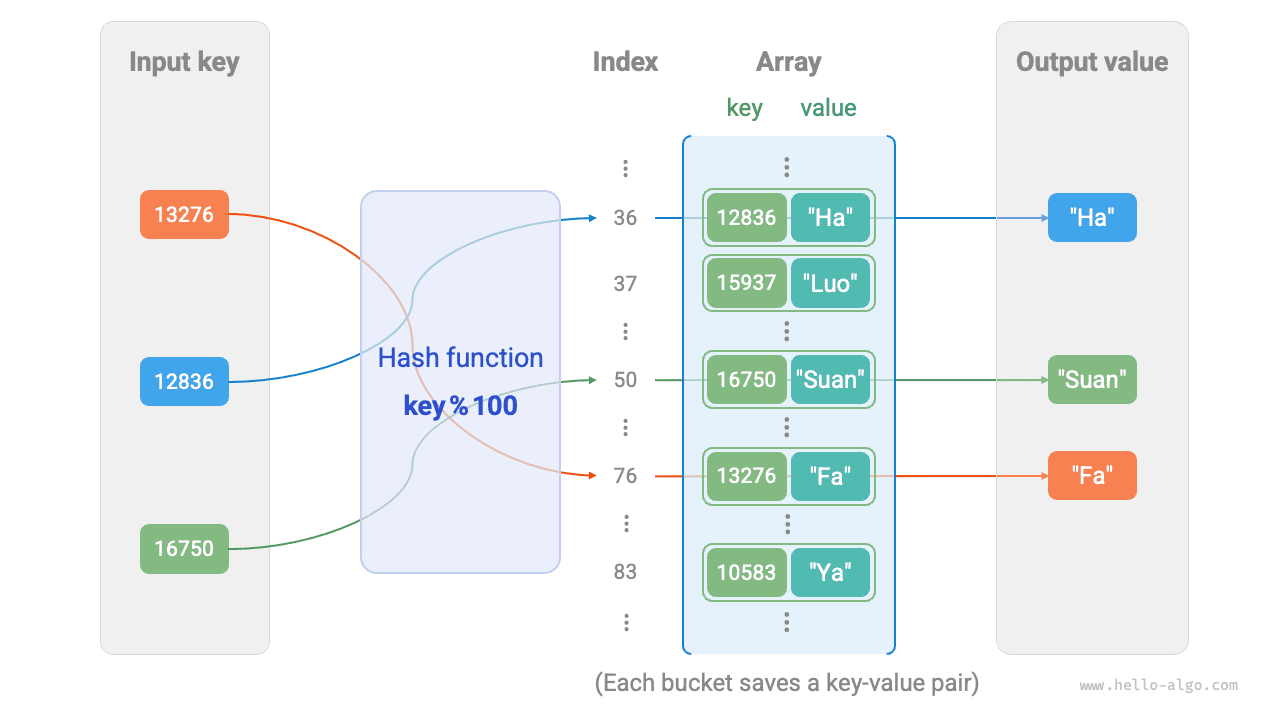
So how do we find the right bucket for a given key? We do this with a hash function. A hash function maps a larger input space to a smaller output space. In a hash table, the input space is the set of all keys, and the output space is the set of all buckets (array indices). In other words, given a key, the hash function tells us where the corresponding key-value pair should be stored in the array.
Given a key, computing the bucket index involves the following two steps:
- Use a hash algorithm
hash()to compute a hash value. - Take that hash value modulo the number of buckets (array length),
capacity, to obtain the bucket (array index)indexcorresponding to thekey.
We can then use index to access the corresponding bucket in the hash table and retrieve the value.
Suppose the array length is capacity = 100 and the hash algorithm is hash(key) = key. Then the hash function is key % 100. The figure below illustrates how this hash function works, using student ID as key and name as value.
The following code implements a simple hash table. Here, we encapsulate key and value into a class Pair to represent a key-value pair.
Hash Collision and Resizing
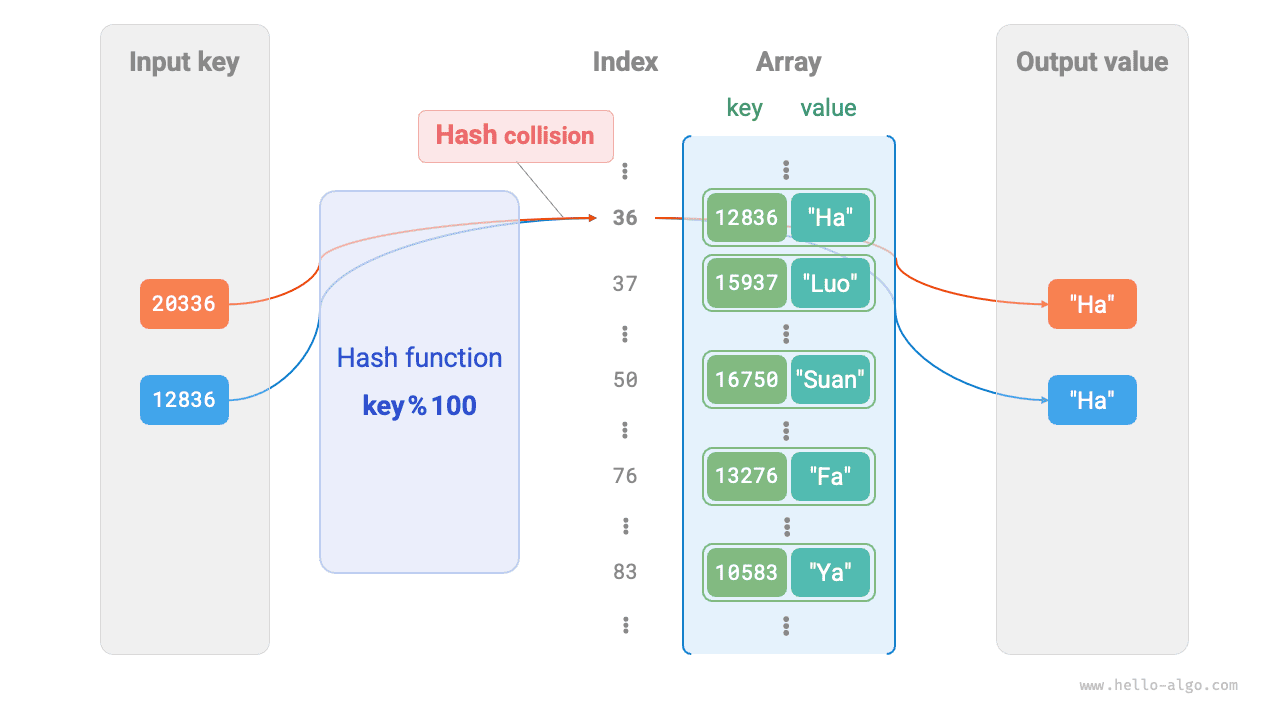
Fundamentally, a hash function maps the input space consisting of all keys to the output space consisting of all array indices, and the input space is often much larger than the output space. Therefore, in theory, different inputs must sometimes map to the same output.
For the hash function in the above example, when the input keys have the same last two digits, the hash function produces the same output. For example, when querying two students with IDs 12836 and 20336, we get:
As shown below, two student IDs now point to the same name, which is clearly incorrect. We call this situation, where multiple inputs map to the same output, a hash collision.
It's easy to see that the larger the hash table capacity \(n\), the lower the probability that multiple keys will be assigned to the same bucket, and the fewer collisions. Therefore, we can reduce hash collisions by expanding the hash table.
As shown in the figure below, before expansion, the key-value pairs (136, A) and (236, D) collided, but after expansion, the collision disappears.
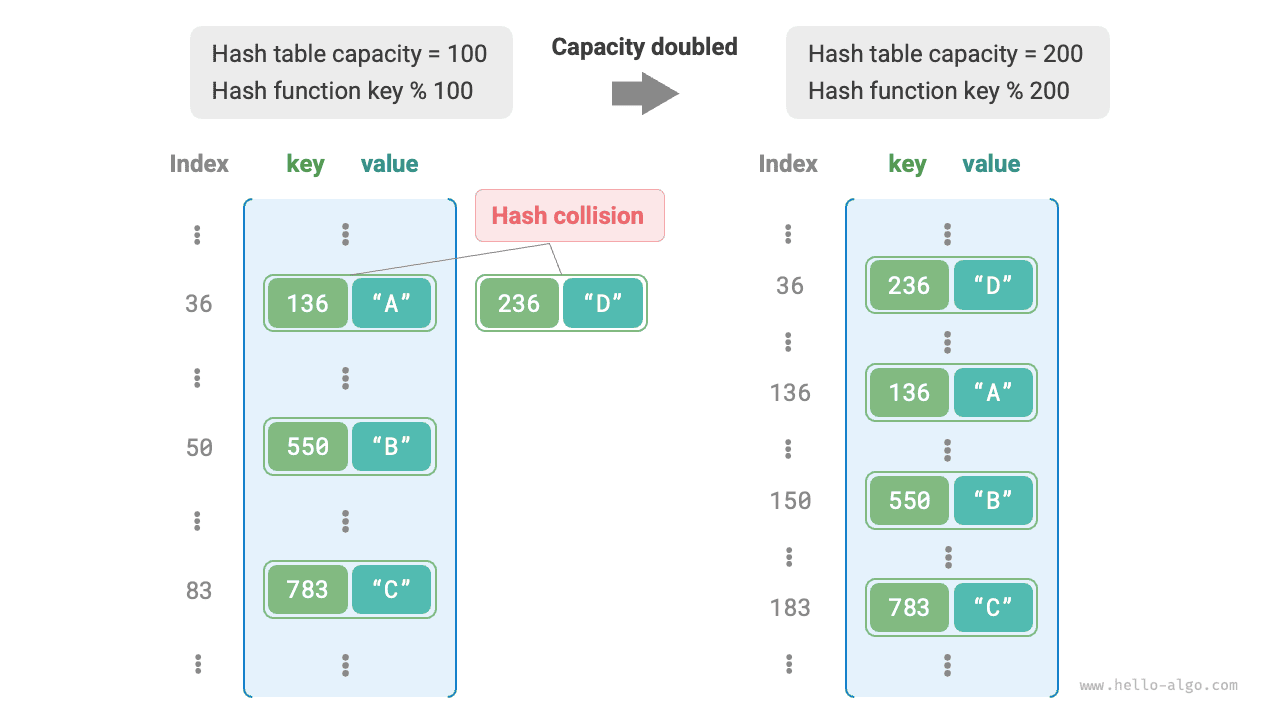
Like resizing an array, resizing a hash table requires migrating all key-value pairs from the original table to the new table, which is expensive. In addition, because the hash table capacity capacity changes, we must recompute the storage location of every key-value pair using the hash function, which further increases the cost of resizing. For this reason, programming languages typically reserve a sufficiently large hash table capacity to avoid frequent resizing.
The load factor is an important concept in hash tables. It is defined as the number of elements in the hash table divided by the number of buckets and is used to measure the severity of hash collisions. It is also commonly used as a threshold for triggering hash table resizing. For example, in Java, when the load factor exceeds \(0.75\), the system expands the hash table to twice its original size.